
Kitchen Display System (KDS) for Restaurants in Bangladesh: How It Works, KDS vs KOT and Cost
A kitchen display system (KDS) is a screen in the kitchen that shows each order from the POS as it is placed, sorted by station, with a timer that shows how long it has waited. It replaces the paper kitchen order ticket (KOT) that a printer prints and a cook reads, loses, or pins in the wrong place. This guide explains how a KDS works, how it differs from paper KOT, whether your restaurant needs one, what it takes to run one in Bangladesh, and what decides the cost.
We are a restaurant software company, so we are not neutral. We have therefore tried to be specific about when paper is still enough. One multi-outlet chain using ZAB POS with a kitchen display reported about 40% faster kitchen preparation and no lost kitchen orders (the client's own figures, not independently audited). Read the multi-outlet restaurant case study for the details.
In this guide
- What is a kitchen display system?
- How a KDS works, step by step
- KDS vs paper KOT: what actually changes
- Do you need a KDS? A short decision guide
- One chain's results with a kitchen display
- What a KDS needs: screens, network and offline behaviour
- What decides the price of a KDS in Bangladesh?
- Seven questions to ask a KDS vendor
- Frequently asked questions
What is a kitchen display system? {#what-is-a-kds}
A kitchen display system is software plus one or more screens that show kitchen staff what to cook. The order comes from the point-of-sale (POS) system, so the cashier or waiter enters it once and the kitchen sees it at once, with no printer and no slip of paper in between. Some vendors call it a kitchen order display system. It is the same idea.
Three things are worth separating, because buyers often mix them up:
- A KDS is not your POS. The POS takes the order and the payment. The KDS is where the order is cooked. The two have to be connected, which is why most restaurants buy them together.
- A KDS is not a customer screen. A token or order-ready screen faces the guest. A KDS faces the cook.
- A KDS is not only a digital copy of the paper ticket. A digital ticket that appears on one screen is a start. A real KDS also sends each item to the right station, times each ticket, and lets the kitchen mark an item ready.
If your current kitchen routine is a printer, a pile of slips and someone shouting "two butter chicken, one without onion", a KDS replaces the printer and the shouting. It does not replace your cooks, and it will not fix a kitchen that has too few of them.
How a KDS works, step by step {#how-a-kds-works}
The steps are the same whichever product you use. Here is one order, from the counter to the table.
An example. A table orders a butter chicken, a mojito and a bowl of ice cream. On paper, one printer prints one slip, and someone decides who cooks what. On a KDS, the same order splits into three parts.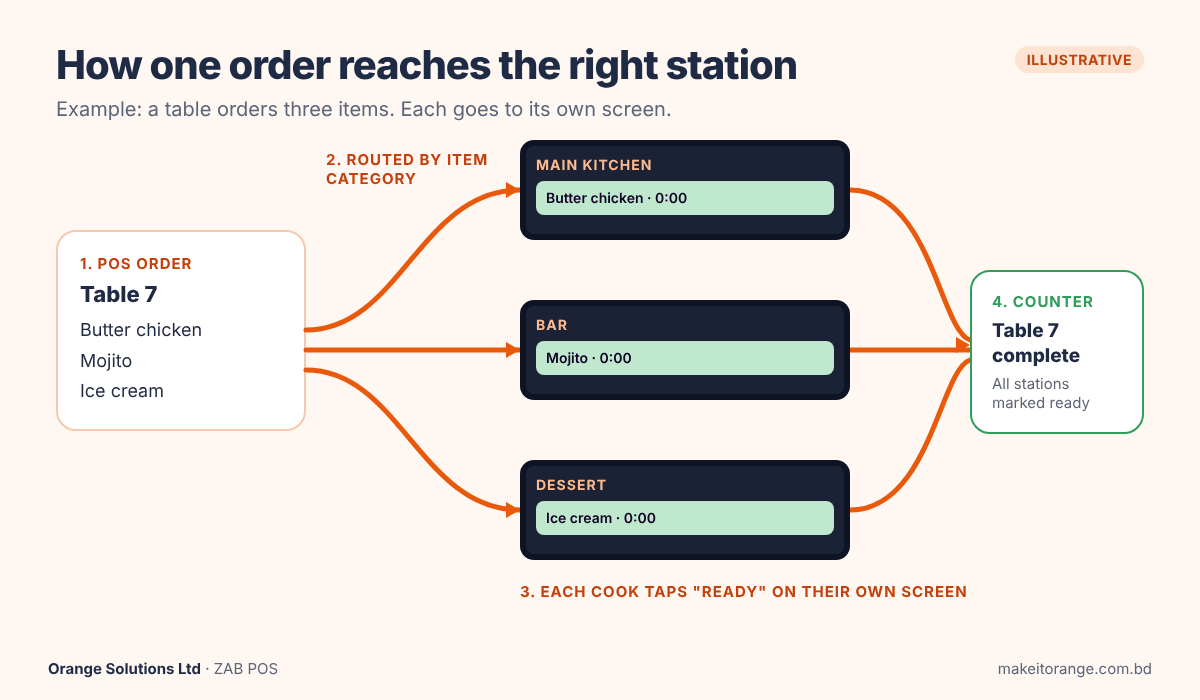
1. The order is entered once, on the POS
The waiter or cashier sends the order from the POS, a tablet or a phone. At a restaurant using ZAB POS, orders can also come from the Order Take app, a QR code at the table or a self-ordering kiosk. Whichever way the order arrives, it goes to the same place.
2. The KDS routes each item to its station
Each item belongs to a station: the grill, the main kitchen, the bar, the dessert counter. The KDS reads the item's category and sends it to the right screen. In the example, the butter chicken goes to the main kitchen, the mojito goes to the bar and the ice cream goes to dessert. The chain in the ZAB POS case study routes orders by recipe category to its grill, bar, dessert and main-kitchen stations.
This step is where a KDS differs most from a single printer. Nobody has to read the slip and decide who cooks what.
3. A timer starts, and the ticket changes as it ages
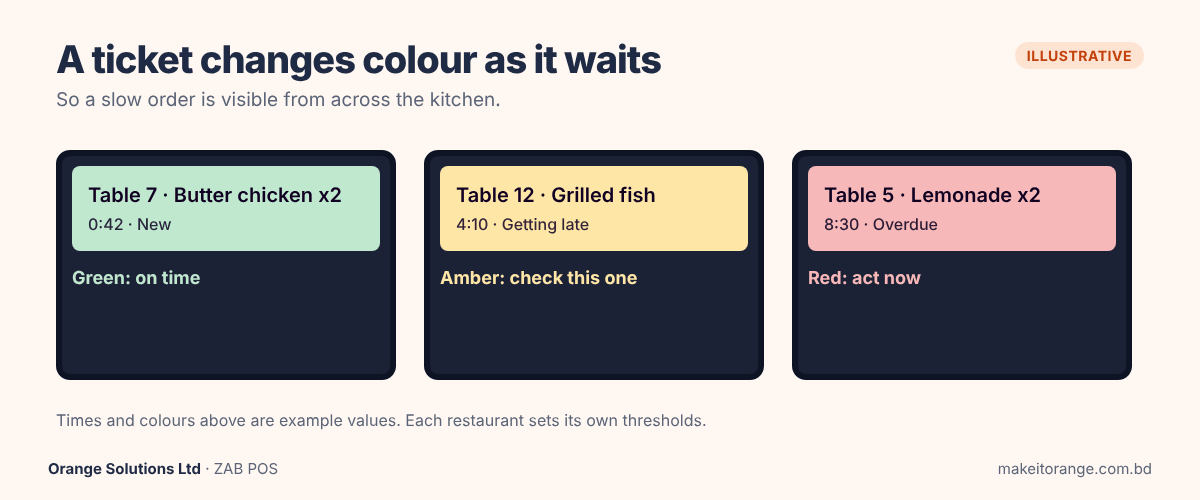
Every ticket shows how long it has waited. As the wait grows, the ticket changes colour, for example from green to amber to red. The exact thresholds are yours to set. A busy line cook can see from across the kitchen which ticket is overdue without reading a single word.
4. The cook marks the item ready
When the cook finishes, one tap clears the item. On paper, "ready" is a shout, a nod or a slip that gets thrown away. On a KDS, it is a recorded event.
5. The rest of the restaurant sees the status
When every station has marked its part ready, the counter or the expo knows the table's order is complete. Some kitchens also show a customer token screen, so guests know when to collect. This is the step that stops a hot dish waiting for a cold one.
What to take from this: a KDS does not make cooks faster. It removes the work around cooking, which is sorting, reading, carrying, remembering and asking "where is table 14?".
KDS vs paper KOT: what actually changes {#kds-vs-kot}
A paper KOT works. Many good kitchens run on it. The question is what it costs you when the kitchen gets busy. The table below compares the two across the things that go wrong in a rush.
| Paper KOT | Kitchen display system | |
| Lost or damaged slips | A slip can be lost, torn, wet or stuck behind another. | An order stays on screen until someone marks it ready. |
| Routing to stations | A person reads each slip and decides who cooks what. | The system sends each item to its station by category. |
| Order timing | Nobody knows how long a ticket waited unless they watched. | Each ticket shows its wait, and the colour changes as it grows. |
| Changes after the order | A change is another slip or a shout, and the first slip may still be on the rail. | The ticket on screen is updated. |
| Reporting | You can only guess which dishes or shifts run slow. | Timings are recorded, so you can see which dishes or shifts run slow. |
| Cost to start | Very low: a printer and paper. | Higher: a screen for each station, plus mounting and network. |
| How it fails | It fails quietly. A slip goes missing and nobody knows until the guest asks. | It fails visibly. If a screen or the network drops, the kitchen knows at once. |
The last row is the one most guides skip, and it is the main reason we think a KDS matters. A lost paper slip leaves no trace, so the first sign of a problem is an unhappy guest. A KDS fault is obvious, so you can switch to a fallback, such as printing KOTs, while it is fixed. In ZAB POS, billing and kitchen order tickets continue when the internet drops, and data syncs to the cloud when it returns.
When paper is still the right answer. If you run a single counter with one cook, a handful of dishes and no one passing tickets between stations, a printer is cheaper and perfectly good. The case for a KDS grows with the number of stations, the number of outlets and the number of orders arriving from different places at once, such as the counter, tables, QR codes and delivery.
One honest caveat. A KDS reveals slow service. It does not cause it to disappear. If a station is slow because it is short-staffed, the screen will show the problem very clearly, and the fix is still a person.
Do you need a KDS? A short decision guide {#do-you-need-a-kds}
Not every restaurant does. Answer these four questions about your kitchen as it runs today.
- How many stations cook in parallel? One station (a single cook or a single line) rarely needs routing. Three or more stations, such as grill, bar, dessert and main kitchen, is where a printer starts to cause confusion.
- How many places do orders come from? Counter, tables, QR codes, a waiter's phone, delivery platforms. Each extra source is another way a slip can arrive late or twice.
- How many outlets do you run? With several outlets, a KDS gives you the same kitchen routine in every branch and timing you can compare across them. Paper gives you neither.
- Do you know today where the delay is? If you cannot say which dish, station or shift runs slow, you are managing by feel. Recorded timing changes that.
What your answers suggest
| Your kitchen | What usually makes sense |
| One counter, one cook, a short menu | Paper KOT or a single printer is fine. Spend on your POS first. |
| One outlet, two or more stations, orders from several sources | A KDS is worth a serious look. Start with the busiest station. |
| Several outlets, a cloud kitchen, or heavy delivery volume | A KDS with central reports gives you control across branches, not only speed. |
Signs that paper is failing you. These are things you can see this week, without any software:
- A guest's order is cooked twice, or not at all, and nobody can say where the slip went.
- Cooks ask the cashier what a slip says.
- A dish is ready but its partner is not, so one plate waits and goes cold.
- You find out a table waited too long only when the guest complains.
If you recognise two or more, a KDS is worth testing. We have not seen your kitchen, so a demo with your own menu is the quickest way to find out.
One chain's results with a kitchen display {#case-study-results}
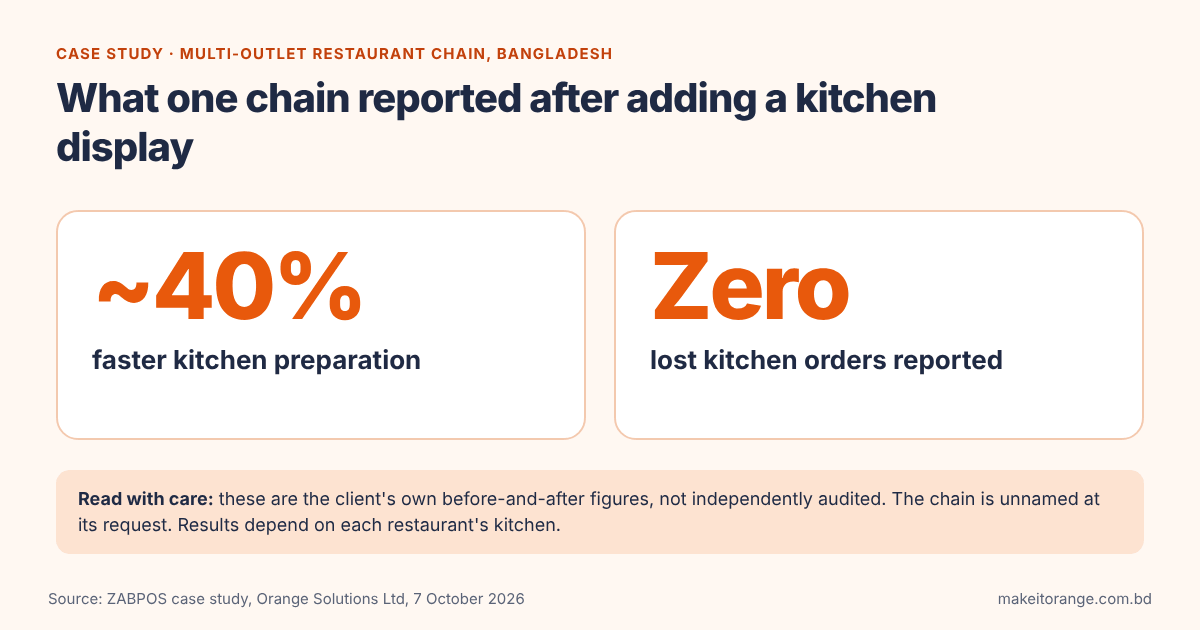
We do not want to retell a case study here, so this is the short version. A multi-outlet restaurant chain in Bangladesh moved from single-terminal billing, paper kitchen slips and manual VAT to ZAB POS with kitchen display. The chain asked not to be named. After go-live it reported:
- About 40% faster kitchen preparation.
- Zero lost kitchen orders, where lost paper slips had been a problem before.
It also reported counter queues more than 60% shorter. That result came mainly from multi-device ordering (guests and waiters ordering from phones, tablets and kiosks), not from the kitchen screens, so do not credit it to the KDS.
Read these figures carefully. They are the client's own before-and-after comparisons of its operational data. They are not independently audited, and this page is published by the vendor, so the results are self-reported. They show what one chain saw. They are not a promise for your restaurant. Your result depends on your kitchen layout, menu, staff and how many stations you run.
Read the full multi-outlet restaurant case study.
See a KDS working with your menu. Book a free demo and tell us how many stations and outlets you run. We will show you the setup that fits, including a simpler one if paper is still enough for you.
What a KDS needs: screens, network and offline behaviour {#what-a-kds-needs}
A KDS is software, but it needs three physical things to work well. Plan them before you plan the software.
1. A screen for each station
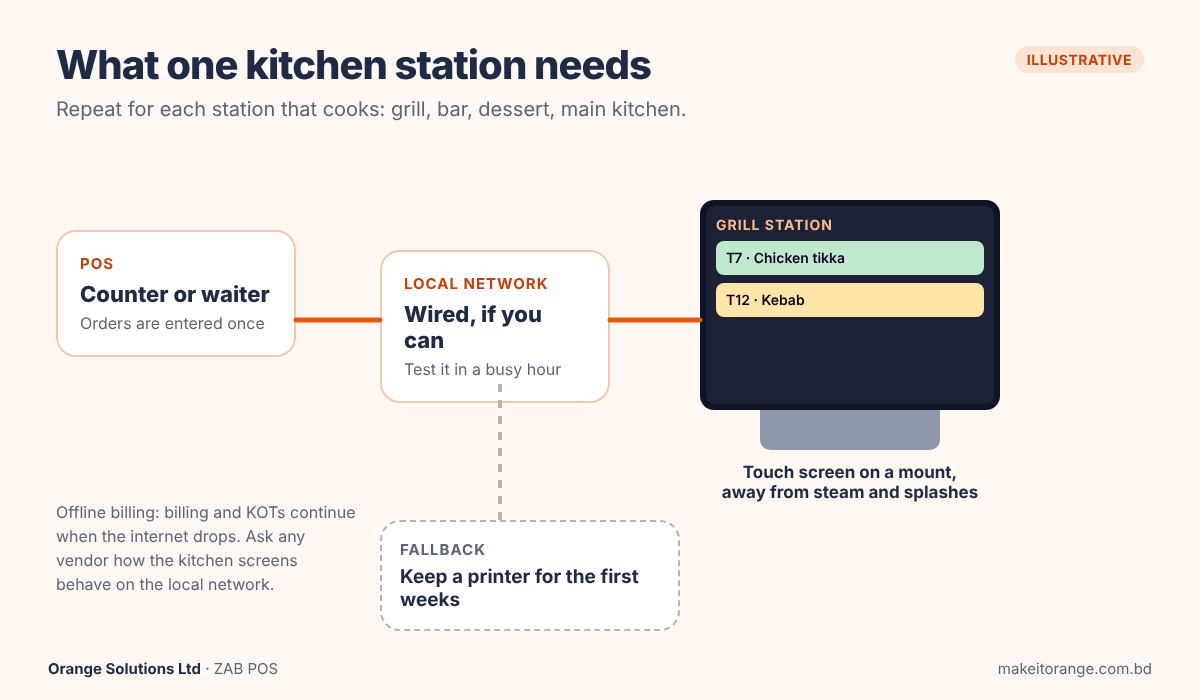
One screen per station that cooks, and optionally one at the pass, where finished dishes are checked before they go out. A kitchen with a grill, a bar, a dessert counter and a main line needs four screens, plus one at the pass if you use it. Start with the busiest station and add more later.
Screens are sold as touch displays, and a KDS screen is chosen for the kitchen: it should handle heat, steam and splashes, and it should be easy to wipe clean. Check how it will be mounted, because counter space in a kitchen is scarce.
About buying the screens. Orange Solutions does not sell kitchen screens. Its team helps you choose and source them from trusted vendors.
What they cost in Bangladesh (market examples). Two screens from one local retailer, BME, show the range. A Sunmi 18.5" Kitchen Display System is listed at ৳64,500, and a Sunmi 22" commercial touch display at ৳71,500 (listings checked on 30 October 2026; prices change, so confirm before you buy). These are retailer examples, not an Orange Solutions quote. At the first price, four screens would come to ৳258,000 before mounting and cabling, so the number of stations you run matters more than the price of any one screen.
2. A stable local network
A KDS depends on the connection between the POS and the screens. In a hot, humid kitchen with a lot of metal, Wi-Fi can be unreliable, so many restaurants run a cable to each station. Ask your installer to test the signal at each station during a busy hour, not only when the kitchen is empty.
3. A plan for when the internet drops
This is a fair worry, because broadband interruptions do happen. ZAB POS uses an offline-first design. In the case study chain, when the connection dropped, cashiers kept billing, taking orders and firing kitchen order tickets locally, and the data synced to the cloud once the internet returned. Billing keeps working offline in every ZAB POS package.
When you compare any vendor, ask one precise question: "If the internet is down, do the kitchen screens keep showing new orders over the local network, and what happens to the data afterwards?" A vendor should answer this plainly, and you should hear the answer before you buy. [Ask product whether ZAB's kitchen screens keep working over the local network when the internet is down.
A simple setup checklist
- Count your stations, and decide whether you want a screen at the pass.
- Choose where each screen is mounted, away from steam and direct splashes.
- Run and test the network at each station in a busy hour.
- Keep a printer or another fallback for the first weeks.
- Train one person per shift to clear tickets and read the colours.
What decides the price of a KDS in Bangladesh? {#kds-price}
When people search for the price of a kitchen display system, they usually find two different things mixed together: the screen and the software. Separate them before you compare quotes.
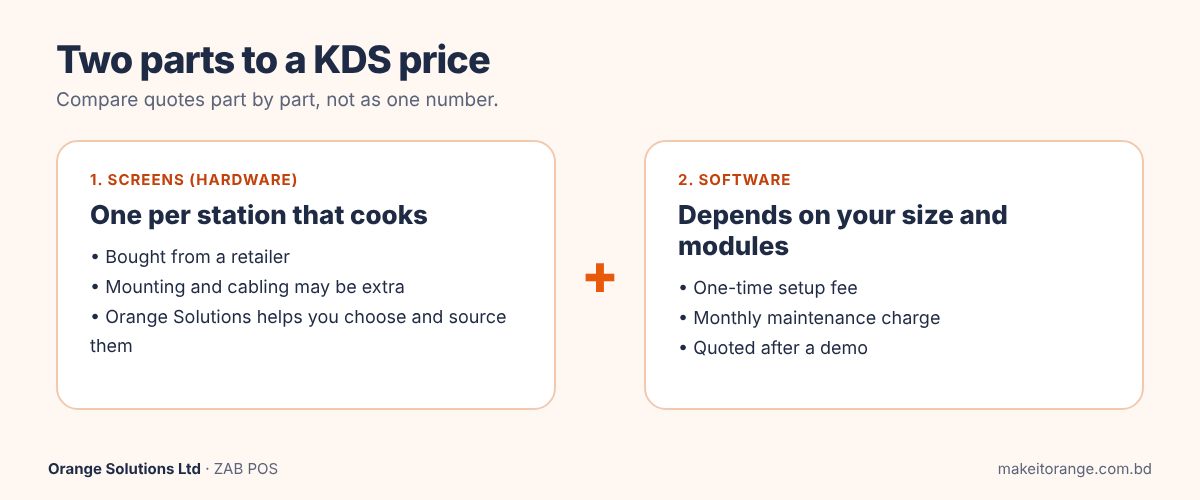
- The screens (hardware). Each station that cooks needs a touch screen. The two BME listings we checked on 30 October 2026 were ৳64,500 for an 18.5-inch kitchen display and ৳71,500 for a 22-inch commercial touch display. Your total is the price per screen multiplied by the number of stations, plus mounting, cabling and installation, which may be quoted separately. Ask every supplier what a quote includes.
- The software. This depends on the size of your restaurant, how many outlets and stations you run, and which modules you need. ZAB POS is priced with a one-time setup fee plus a monthly maintenance charge. We do not publish a figure, because a single counter and a ten-outlet chain are different projects. Book a free demo and you will get a quote based on your outlets and requirements.
What to ask for in any quote
- The price of the software, shown separately from the screens.
- What the one-time fee covers (setup, data loading, training).
- What the monthly charge covers (support, updates).
- Who supplies, mounts and cables the screens.
- What it costs to add one more station or one more outlet later.
Be careful with any number that arrives without a scope. A low price for "a kitchen display system" may be a screen with no software, or software with no support.
Seven questions to ask a KDS vendor {#vendor-questions}
Use these with every vendor you shortlist, including us.
- "What happens when the internet is down?" Ask about billing, taking orders and the kitchen screens separately, and what happens to the data afterwards. In ZAB POS, billing and kitchen order tickets continue locally and sync when the internet returns.
- "How does an item get to the right station?" Look for routing by item category (grill, bar, dessert, main kitchen) that you can set up yourself, not a single shared screen.
- "Can I see and change the timers?" You want ticket timers and colour changes whose thresholds match your own service standards.
- "Is the KDS part of the POS or a separate product?" If it is separate, ask who is responsible when an order does not arrive.
- "Which screens do you support, and who sources them?" Orange Solutions does not sell screens; its team helps you choose and source them. Ask every vendor the same question, and ask for it in writing.
- "Who trains my staff, and is it in the price?" Ask about the first week and about new hires six months later. Staff training is fully included in the ZAB POS setup package.
- "Can I get my data out?" You should be able to export sales history and records to Excel or CSV whenever you want, including if you leave.
Frequently asked questions {#faq}
What is a KDS system?
A KDS (kitchen display system) is a screen in the kitchen that shows orders from the POS in real time, sorted by station, with a timer on each ticket. It replaces the printed kitchen order ticket and lets cooks mark each item ready with a tap.
What is the difference between a KDS and a KOT?
A KOT (kitchen order ticket) is the order itself, usually printed on paper. A KDS is the screen that shows it. A digital ticket on a single screen only replaces the paper. A full KDS also sends each item to the right station and shows how long each ticket has waited, with colour alerts as it ages.
Does a small restaurant need a kitchen display system?
Not always. A single counter with one cook and a short menu can run well on a printer. A KDS becomes worth it as you add stations, order sources or outlets. If you cannot say which dish or shift runs slow, recorded timing is useful even in a small kitchen.
Does a kitchen display system work without internet?
In ZAB POS, billing, order-taking and kitchen order tickets continue when the internet drops, and data syncs to the cloud when the connection returns. Whatever the vendor, ask specifically how the kitchen screens behave on the local network during an outage.
What hardware does a kitchen display system need?
A touch screen for each station, a way to mount it, and a stable local network, ideally tested at each station in a busy hour. Orange Solutions does not sell the screens, but its team helps you choose and source them from trusted vendors.
How much does a kitchen display system cost in Bangladesh?
There are two costs. Screens are listed by one local retailer at ৳64,500 (18.5-inch kitchen display) and ৳71,500 (22-inch touch display), checked on 30 October 2026. The software price depends on your size and modules. ZAB POS uses a one-time setup fee plus a monthly maintenance charge, quoted after a demo.
Ready to see it with your own menu?
Tell us how many stations and outlets you run, and we will show you a setup that fits, including a simpler one if paper is still enough for you. Book a free demo.
Related reading: ZAB POS, restaurant POS software for Dhaka and Bangladesh · Food and beverage industry solutions · Best restaurant management software in Bangladesh