- Neptune Heights (5th floor), Plot #2, Road #11, Block C, Section-6, Mirpur, Dhaka-1216

ZAB POS: Restaurant POS and Management Software for Dhaka and Bangladesh
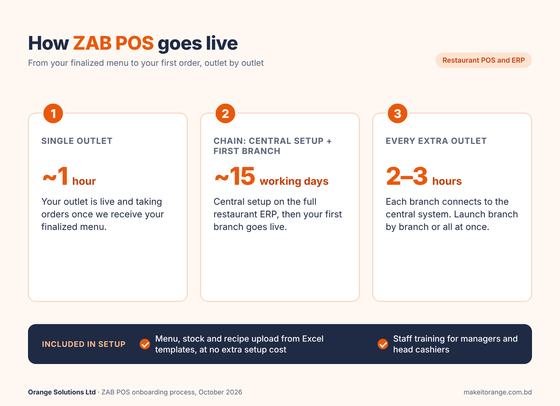
ZAB POS – Restaurant POS and Management Software for Dhaka and Bangladesh: One restaurant system for billing, kitchen, tables, stock, VAT and every outlet's numbers, and billing keeps running when the internet drops. A single outlet can go live in about an hour once you send your finalized menu, and once a chain's central setup is done, each extra branch connects in 2 to 3 hours. Built by Orange Solutions, with more than 18 years of experience in restaurant automation and enterprise management across Bangladesh, and 600+ restaurant outlets using ZAB POS and ERP today. A multi-outlet chain using it cut counter queues by over 60% and kitchen prep time by about 40%. Read the case study. Book a free demo. It features the following:
- Billing, kitchen display, QR ordering and NBR VAT in one system, working offline in every package
- Move your menu, recipes and stock in with our Excel templates, with staff training included
- Cloud or on-premise, your data exportable to Excel or CSV, and 24/7 support
- bKash, Nagad, Rocket and card payments at checkout, with Foodpanda and Pathao orders tracked by channel
- ZAB POS Lite for a single outlet or ZAB Restaurant ERP for a chain
Features

Restaurant POS
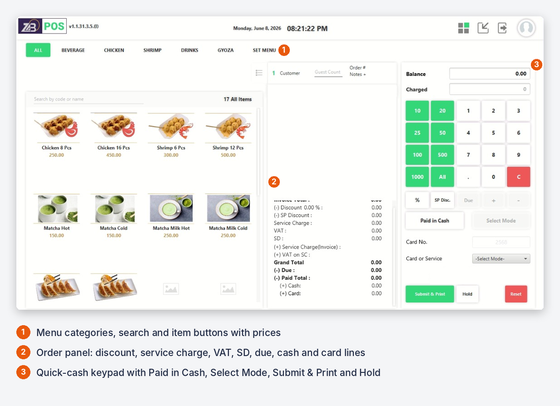
Billing, discounts and kitchen order tickets from one screen. Take cash, card, bKash, Nagad and Rocket, and send digital invoices by SMS or WhatsApp. Voids, item deletions after KOT and price changes need a manager OTP. Billing keeps working offline in every package.

KOT Management
KOT management efficiently manages and organizes the orders sent from the front-of-house to the kitchen or bar for preparation. POS system with KOT management capabilities allows staff to generate and track KOTs electronically, ensuring seamless communication between the front-of-house and kitchen staff. It helps prioritize orders, monitor order status, and ensure timely preparation and delivery of food and beverages.

Inventory Management
Define each dish as a recipe and ingredients are deducted automatically at billing, in grams, kilograms, ounces, boxes and dozens. Transfer stock between branches and track purchases against a central warehouse. Opening stock and recipes load from Excel templates.

Menu Management
Involves using software tools and strategies to design and present menus that align with the restaurant's concept, pricing, and target audience. This system allows restaurant owners and managers to easily modify menu items, add seasonal specials, adjust prices, and track ingredient availability.

Table Management
This software efficiently organizes and optimizes the seating arrangements and utilization of tables in a restaurant. It involves using a table management system to track table availability, manage reservations, and efficiently assign tables to customers and provides real-time visibility into table status, enable staff to monitor table turnover, and facilitate table rotation for maximum seating capacity.

Sales Report
Provides a summary of the financial performance of a restaurant over a specific period. It includes crucial information such as total sales revenue, average sales per day, and sales breakdown by categories like food, beverages, and other revenue streams. The report may also highlight key trends, such as peak sales hours or popular menu items.

Mobile App (Customer Order)
This smartphone application allows customers to conveniently place orders for food and beverages directly from their mobile devices. The app provides a user-friendly interface where customers can browse the menu, customize their orders, specify pick-up or delivery preferences, and make secure payments.